Blur & Pixelate Photos Online Free – The Fastest Way to Protect Sensitive Images
In today’s digital world, privacy matters more than ever. Whether you are uploading screenshots, sharing personal documents, posting social media content, or hiding sensitive information inside photos, having a reliable blur and pixelate tool is essential. That’s exactly where the Pixelate Tool by ZLVOX becomes incredibly useful.
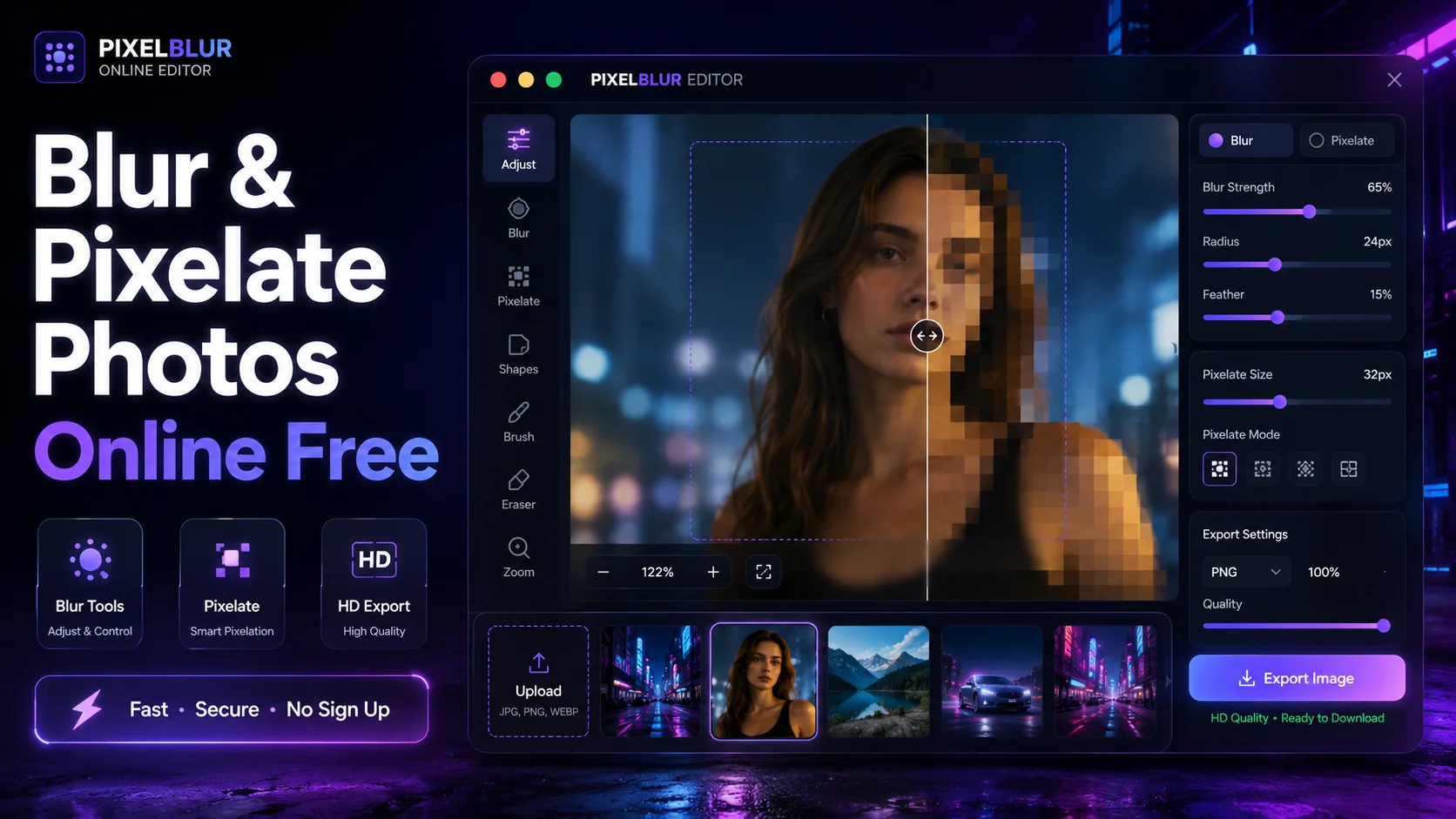
The tool is designed for speed, simplicity, and professional-quality results. You can blur backgrounds, censor faces, hide personal information, and pixelate any part of an image directly from your browser without installing software or creating an account.
If you are looking for a fast, free, and privacy-friendly image censoring solution, the ZLVOX Pixelate Tool is one of the best browser-based options available today.
What Is the ZLVOX Pixelate Tool?
The ZLVOX Pixelate Tool is an online image editing utility that allows users to blur or pixelate specific parts of a photo instantly. It works directly inside the browser, making the editing process smooth and lightweight on both desktop and mobile devices.
Unlike complicated photo editing software, this tool focuses on one thing: helping users quickly hide or censor sensitive content without sacrificing image quality.
You can use it to:
- Blur faces in photos
- Pixelate personal information
- Hide license plates
- Censor screenshots
- Blur backgrounds instantly
- Create privacy-safe social media posts
- Protect confidential documents
Why People Need Blur and Pixelate Tools Today
Every day, millions of people share images online without realizing how much private information those images contain. Phone numbers, addresses, email IDs, payment details, faces, usernames, and other sensitive information can easily become visible inside screenshots or photos.
Using a blur or pixelate tool helps protect privacy while still allowing users to share content publicly.
Content creators, journalists, students, developers, marketers, and businesses all use image censoring tools regularly. Whether it is for professional work or personal privacy, image protection has become an important part of online safety.
Key Features of the ZLVOX Pixelate Tool
1. Instant Browser-Based Processing
The tool works entirely inside your browser. There is no software installation, no heavy apps, and no complicated setup required. Simply upload your image, select the blur or pixelate option, adjust the intensity, and download the edited image instantly.
2. Free to Use
One of the biggest advantages of the ZLVOX Pixelate Tool is that it is completely free. Users can edit images without paying subscription fees or purchasing premium plans.
3. No Signup Required
You do not need to create an account or enter personal details. Open the tool, upload your image, edit it, and download the final result immediately.
4. High-Quality Export
Many online image editors reduce image quality after editing. The ZLVOX Pixelate Tool preserves image clarity while applying blur or mosaic effects, making it perfect for professional use.
5. Mobile Friendly
The interface is optimized for smartphones, tablets, and desktops. Users can blur or pixelate photos directly from mobile browsers without performance issues.
6. Multiple Blur Controls
The tool offers adjustable controls for blur intensity, pixelation size, and effect radius. This allows users to customize the exact level of censorship needed.
Blur vs Pixelate – What’s the Difference?
Many users often confuse blur and pixelation effects, but both serve slightly different purposes.
Blur Effect
Blur softens the selected area using smooth gradients. It is commonly used for artistic effects, hiding backgrounds, or lightly concealing information.
Blur works best for:
- Background editing
- Portrait photography
- Soft privacy protection
- Aesthetic image effects
Pixelate Effect
Pixelation creates block-style mosaic squares over selected parts of the image. This effect is stronger for censoring sensitive content.
Pixelation works best for:
- Hiding faces
- Censoring documents
- Protecting identities
- Masking confidential information
How to Use the Pixelate Tool Online
Using the tool is extremely simple, even for beginners.
- Open the ZLVOX Pixelate Tool
- Upload your image
- Select Blur or Pixelate mode
- Adjust the intensity slider
- Apply the effect to the desired area
- Download the edited image
The entire process takes less than a minute.
Best Use Cases for Online Blur and Pixelation
Social Media Privacy
Before uploading screenshots or photos online, users can hide personal details such as usernames, contact information, or private conversations.
YouTube Thumbnails
Content creators often blur backgrounds or censor elements inside thumbnails to create more dramatic visuals.
Document Protection
Students and professionals can hide confidential data inside screenshots, reports, and PDFs converted into images.
Face Censoring
Journalists, bloggers, and photographers frequently need to hide faces to protect identities.
Business Security
Companies can use pixelation to hide customer information, employee details, or sensitive analytics before sharing images publicly.
Why ZLVOX Pixelate Tool Stands Out
There are many online blur tools available, but most suffer from slow performance, poor design, watermarks, or complicated editing interfaces.
The ZLVOX Pixelate Tool focuses on speed, clean UI, simplicity, and privacy-first functionality. Its modern dark interface feels professional while remaining easy to use for beginners.
The tool also avoids unnecessary distractions and keeps the workflow minimal, helping users edit images faster.
SEO Benefits for Content Creators
Many bloggers and YouTubers use blur effects strategically to improve engagement. Blurred previews often increase curiosity and click-through rates on thumbnails and promotional graphics.
Pixelation can also help creators safely share examples, analytics, or case studies without exposing private information.
Is the Pixelate Tool Safe?
Yes. Since the tool works directly inside the browser, users do not need to install unknown software. It is designed to offer a lightweight and secure editing experience.
For users who value privacy and quick editing, browser-based tools are often more convenient than downloading heavy applications.
Final Thoughts
If you regularly share screenshots, social media posts, documents, or online content, having a reliable blur and pixelate editor is essential. The ZLVOX Pixelate Tool offers a fast, clean, and professional solution for protecting sensitive information online.
With instant browser-based editing, high-quality exports, mobile support, and free access, it is an excellent choice for creators, professionals, students, and everyday users.
Try the tool here:
https://zlvox.com/tools/pixelate-tool
Frequently Asked Questions
Is the ZLVOX Pixelate Tool free?
Yes, the tool is completely free to use.
Can I blur faces online?
Yes, you can blur or pixelate faces directly inside the browser.
Does the tool work on mobile devices?
Yes, the tool is fully optimized for smartphones and tablets.
Do I need to install software?
No, everything works online without downloads or installations.
Can I pixelate screenshots?
Absolutely. The tool works perfectly for censoring screenshots and sensitive information.
Does the tool add watermarks?
No, the exported images remain clean without unwanted watermarks.